Clefsy

Scheduling for music lessons, private and group.

Private lessons, semi-private lessons and group classes share one calendar, with recurring lessons that keep rolling forward. Late-cancellation fees, make-up credit that tracks itself, and calendar import are built in.
Start freeFree to start. No credit card required.
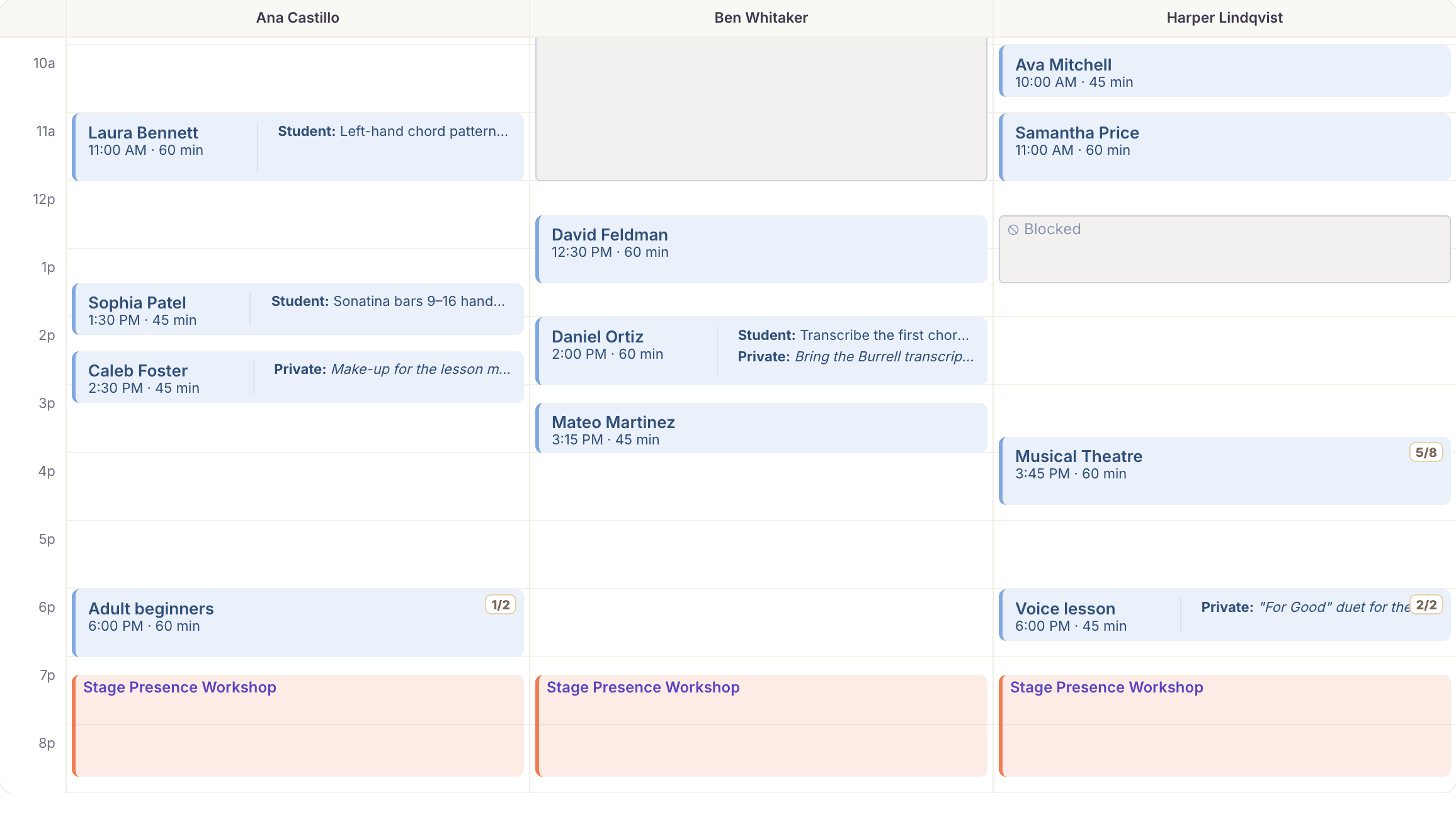
The Clefsy day view with a column per teacher: private lessons, a two-seat voice lesson, a Musical Theatre class, blocked time and an evening workshop

What's included

Studio calendar
Day, week and month views of every lesson, class and event.
Recurring lessons
Weekly, every two weeks or monthly. Runs until you cancel, for a set number of lessons, or until a date. Each lesson can still be moved on its own.
Private, semi-private and group lessons
One calendar for all three. Semi-private and group lessons are priced per seat and carry a capacity.
Waitlists for full classes
Students wait in order for a seat in a full class or semi-private lesson. When a seat frees up, the next person is offered it.
Lesson types, priced your way
Each lesson type has its own price for each lesson length, 30, 45 or 60 minutes or any length from 5 minutes to 4 hours (a 30-minute and a 60-minute lesson don't have to be proportional). There's no hourly rate to work around.
Buffer time
A rest gap you set is kept after every lesson, and students can't book into it.
Home lessons
Teachers can travel to students' homes, with travel time kept free before and after.
Online lessons
Zoom or Google Meet links created on the lesson once you connect them.
Google Calendar sync
Connect Google Calendar and lessons are added, moved and removed there as they change.
Calendar invites
Teachers, and students if you turn it on, get each lesson as a calendar invite that updates itself when the lesson moves.
Closures, time off and one-time changes
Close the studio for a holiday, mark a teacher away, or add an extra Saturday without touching the weekly pattern.
Hours that change on a date
Set next term's hours now; they take effect by themselves on the day.
Late-cancellation policy
Choose what a late cancellation costs: nothing, the full price, a flat fee, a percentage, or one lesson from their package.
Make-up credit
A lesson canceled with notice is never lost. A package lesson goes back on the package, and a paid lesson becomes credit for what was actually paid, taken off the next lesson or invoice by itself. A late cancellation or a no-show follows your policy instead.
Students book their own make-up
Students and parents see their credit in the portal and the app, and the booking screen shows how much of the next lesson it covers. They pick a make-up from your open times, with your approval if you want it.
When you cancel
Mark a cancellation as yours, or as weather or a closure, and no fee is charged. A package lesson goes back on the package, and anything already paid becomes credit or a refund.
Make-ups owed, at a glance
Add the Make-ups owed tile to Reports to see how much make-up credit your studio holds, and for how many students.
Reschedule requests
Students ask to move a lesson; you approve or decline.
Import your schedule
Bring existing lessons in from Google Calendar or any .ics file. Standing weekly lessons are detected and turned into recurring ones.
Calendar feed
Subscribe from Google, Apple or Outlook Calendar to see your lessons there.

Common questions

Can students have a standing weekly lesson?

Yes. Book it as recurring (weekly, every two weeks or monthly) and it keeps rolling forward until you cancel it, reach a set number of lessons or reach an end date.

Can I charge for late cancellations?

Yes. You set how many hours' notice counts as late and what it costs: nothing, the full price, a flat fee, a percentage, or one lesson from their package.

What happens to a lesson I cancel myself?

Nothing is charged. A package lesson goes back on the package, and anything already paid becomes make-up credit or a refund, your choice. If you already know the new time, reschedule instead, and the lesson moves with its notes and payment.

Is it only for voice teachers?

No. Clefsy is built for music teachers and voice teachers: piano, guitar, strings, band, drums and voice. Students book by instrument, and only the teachers who teach it appear.

Can I bring my current schedule over?

Yes. Import from Google Calendar or any .ics file. Standing weekly lessons are detected, and nothing is created until you confirm.

Start free. Never pay more than $49.

Solo studios are always free. Encore is $10 a month, each extra teacher is $5, and the bill never goes above $49. You never pay per student.

Start free →