
Everything a music studio runs on, in one place.
From booking and scheduling to payments, CRM, communication, payroll and reporting, Clefsy brings everything together, with an AI assistant that handles the busywork when you ask.
Start freeStudents book themselves. You approve.
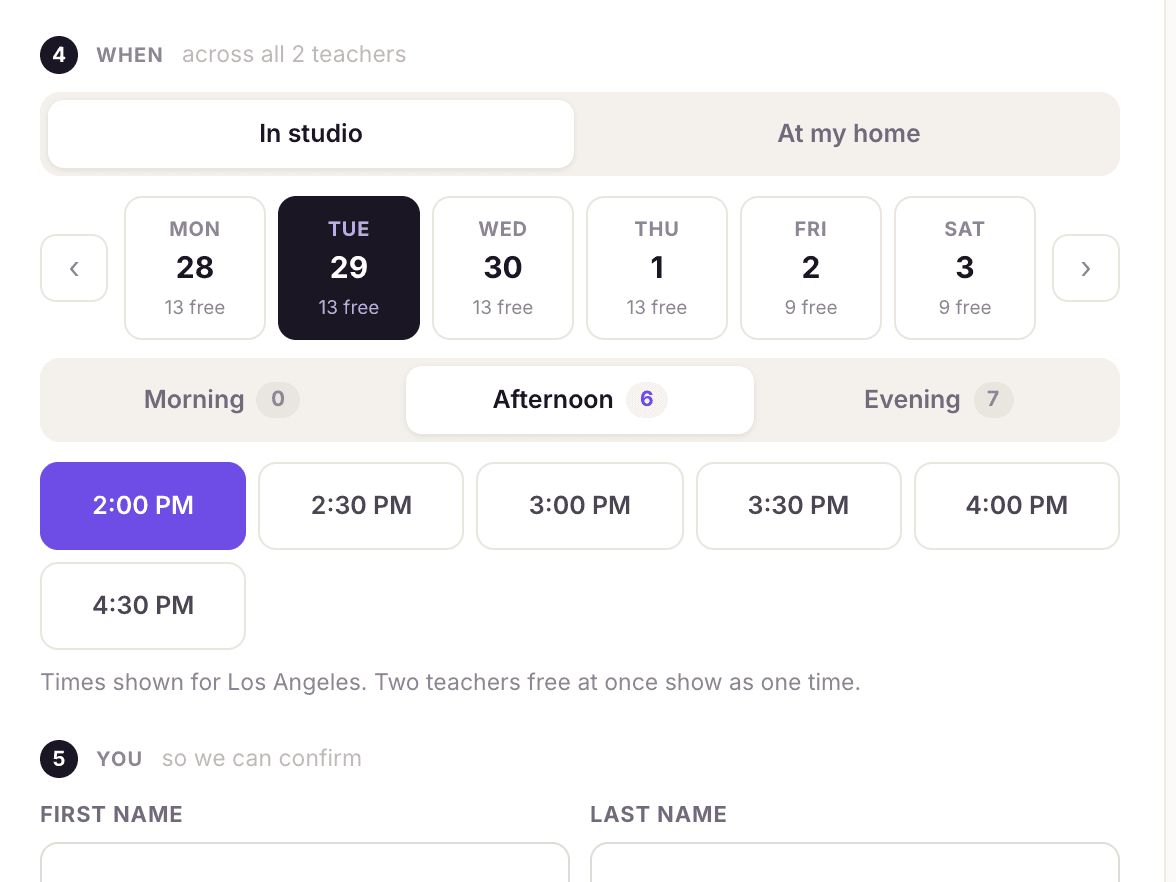
Your own studio website with online booking. Publish the hours you want to teach, let students pick a time, and offer canceled slots to someone else.
Scheduling
Learn more →Scheduling for music lessons, private and group.
- Studio calendar: Day, week and month views of every lesson, class and event.
- Recurring lessons: Weekly, every two weeks or monthly. Runs until you cancel, for a set number of lessons, or until a date. Each lesson can still be moved on its own.
- Private, semi-private and group lessons: One calendar for all three. Semi-private and group lessons are priced per seat and carry a capacity.
See all 20 features
- Waitlists for full classes: Students wait in order for a seat in a full class or semi-private lesson. When a seat frees up, the next person is offered it.
- Lesson types, priced your way: Each lesson type has its own price for each lesson length, 30, 45 or 60 minutes or any length from 5 minutes to 4 hours (a 30-minute and a 60-minute lesson don't have to be proportional). There's no hourly rate to work around.
- Buffer time: A rest gap you set is kept after every lesson, and students can't book into it.
- Home lessons: Teachers can travel to students' homes, with travel time kept free before and after.
- Online lessons: Zoom or Google Meet links created on the lesson once you connect them.
- Google Calendar sync: Connect Google Calendar and lessons are added, moved and removed there as they change.
- Calendar invites: Teachers, and students if you turn it on, get each lesson as a calendar invite that updates itself when the lesson moves.
- Closures, time off and one-time changes: Close the studio for a holiday, mark a teacher away, or add an extra Saturday without touching the weekly pattern.
- Hours that change on a date: Set next term's hours now; they take effect by themselves on the day.
- Late-cancellation policy: Choose what a late cancellation costs: nothing, the full price, a flat fee, a percentage, or one lesson from their package.
- Make-up credit: A lesson canceled with notice is never lost. A package lesson goes back on the package, and a paid lesson becomes credit for what was actually paid, taken off the next lesson or invoice by itself. A late cancellation or a no-show follows your policy instead.
- Students book their own make-up: Students and parents see their credit in the portal and the app, and the booking screen shows how much of the next lesson it covers. They pick a make-up from your open times, with your approval if you want it.
- When you cancel: Mark a cancellation as yours, or as weather or a closure, and no fee is charged. A package lesson goes back on the package, and anything already paid becomes credit or a refund.
- Make-ups owed, at a glance: Add the Make-ups owed tile to Reports to see how much make-up credit your studio holds, and for how many students.
- Reschedule requests: Students ask to move a lesson; you approve or decline.
- Import your schedule: Bring existing lessons in from Google Calendar or any .ics file. Standing weekly lessons are detected and turned into recurring ones.
- Calendar feed: Subscribe from Google, Apple or Outlook Calendar to see your lessons there.
Availability & open slots
Learn more →See your open hours, and fill them.
- Availability at a glance: One grid of every teacher's hours and the lesson types they teach, showing where the studio is covered.
- "Hours set" and "Still open": See the weekly pattern, or what's actually left this week after bookings.
- Weekly load: A bar per day showing booked versus open time, so unsold hours stand out.
See all 8 features
- Book from an open hour: Click an open hour to see who's free and book it right away.
- Teachers set their own hoursEnsemble: Optional. You can keep teachers' hours inside studio hours.
- Fill a canceled time slot: When a lesson is canceled, offer the freed time to your students by email and app notification. The first to claim it gets it.
- "Fill your week": Each teacher's home screen shows their open time for the week.
- Capacity reporting: A capacity heatmap, open slots and teacher load in Reports.
Studio website & online booking
Learn more →Your studio website, with booking built in.
- Your own studio website: A public page at your own link (clefsy.com/book/your-studio) with your photo, bio, lessons, prices, packages, teachers, reviews, policies, hours, location, FAQ and social links. Students book right from it. Included on every plan.
- A look that's yours: Choose from six looks, six font pairings and four header styles. Turn each section on or off, rename its heading and add sections of your own. No code and no designer.
- Your own booking page: Students see your lessons, prices, packages, classes and reviews, then book. They don't need an account.
See all 13 features
- Share it anywhere: One short link for your Instagram bio, Google profile, flyers and email signature.
- Embed on your website: Paste one snippet into Squarespace, Wix or WordPress: the full page, just the offer, or a small booking widget.
- Teacher booking pages: A public page for each teacher with their bio, specialties, reviews, prices and a live booking calendar.
- Booking link for one teacher: Share a link that only books that teacher.
- Book by instrument: Students pick an instrument and a lesson, and only the teachers who teach it appear.
- Approve bookings first: Optionally hold new bookings until you approve them.
- Your own intake questions: Ask what you need to know (text, number, date, choice, checkbox). The answers land on the student's record.
- Classes with seats left: Group classes show when they meet, the price and how many seats remain.
- Class waitlist: When a class is full, students join the waitlist from the booking page. A freed seat goes to the next person, either automatically or when you approve.
- Share & embed: Every public link and embed code in one place.
Stop chasing people for money.
Autopay, invoices, packages and card payments, straight to your own Stripe account. We never hold it and never take a cut.
Payments & invoices
Learn more →Get paid without chasing anyone.
- Card payments into your own Stripe: Card, Apple Pay and Google Pay go straight to your bank. We never hold your money or take a cut.
- Venmo, Cash App, PayPal and Zelle: Students tap a pay link with the amount filled in. For Zelle, they see the amount and where to send it.
- Cash and check: Record them in a tap, with the method noted.
See all 16 features
- You choose when lessons are billed: At booking, the day before, after the lesson, or monthly in advance.
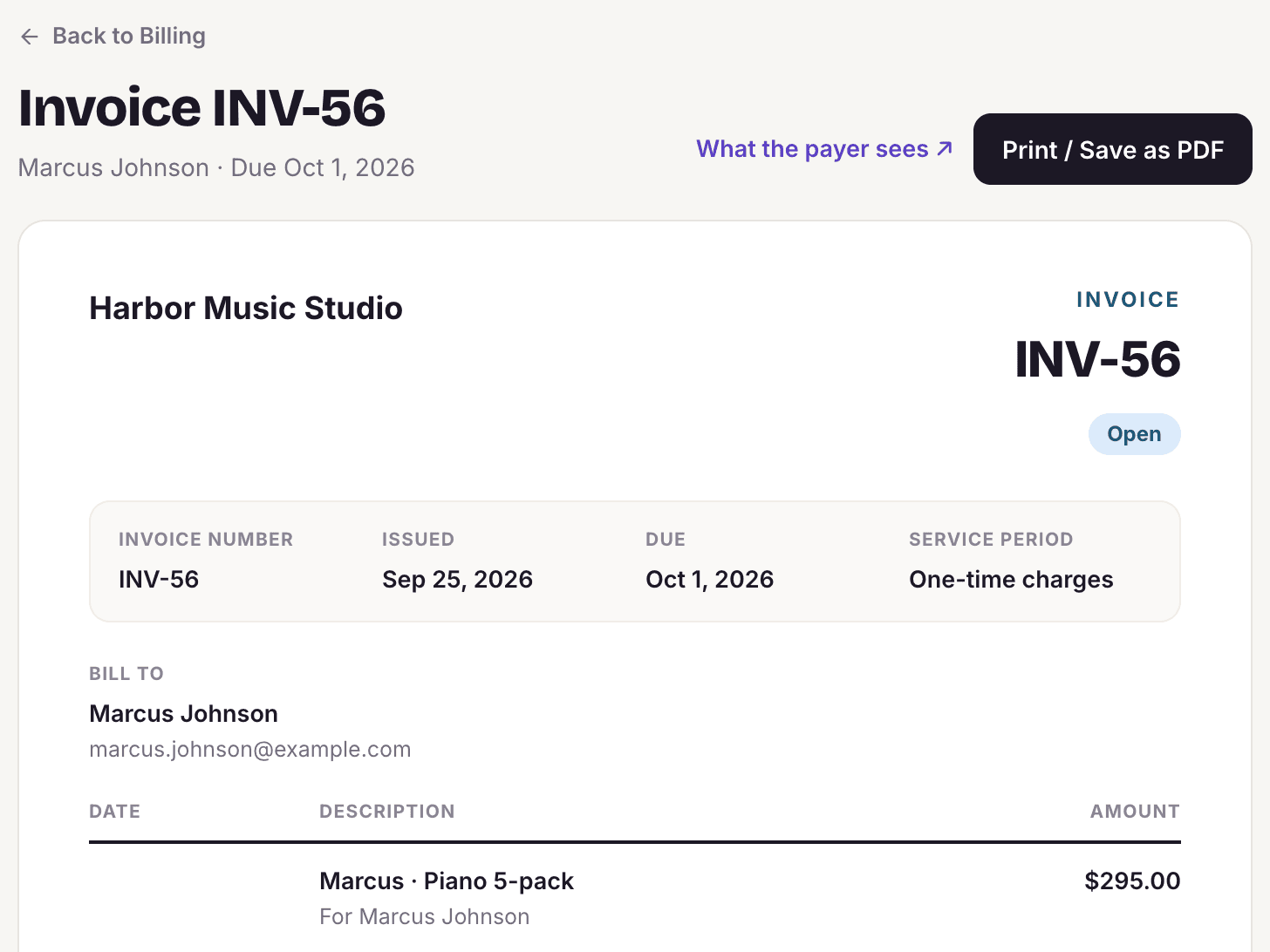
- Invoices that send themselves: Each lesson, or each month, gets an invoice with a pay link, sent on schedule.
- Automatic overdue reminders: The day before, on the due date, then 3 and 7 days late. They stop the moment it's paid.
- Late-cancellation fees: Set the notice window and what a late cancellation costs: the full price, a flat fee, a percentage or one package lesson. A cancellation inside the window offers that charge in one tap, or a waiver, and the charge is added to what they owe.
- Siblings on one invoice: Brothers and sisters billed together on one invoice to the parent who pays, grouped by child.
- Autopay: Students and parents turn on autopay and their card on file is charged on each invoice's due date, and every invoice is emailed first. They can switch it off any time.
- One-time charges: Add a method book or recital fee to the next invoice.
- Sibling discounts: Standing discounts applied on every invoice.
- Refunds: Full or partial, from the lesson. Refunds made in Stripe sync back.
- Who pays the card fee: Pass the processing fee to the student, or absorb it.
- Receipts: Card receipts emailed automatically.
- Cards on file: Students save a card securely for autopay and one-tap payments. You never see or type the number.
- Who owes what: One list of unpaid lessons, overdue invoices and failed charges, each with a one-tap reminder or retry.
Packages, offers & gifts
Learn more →Sell packages that keep track of themselves.
- Lesson packages: Sell 5, 10 or any number of lessons at a set length and price, with or without an expiration date.
- Packages that track themselves: Like a punch card: each lesson is deducted from the package on its own, and you're alerted when the balance runs low. Students can get a heads-up too.
- Buy-again links: When a package runs out, the student gets a link to buy the next one.
See all 9 features
- Optional auto-renew: Only if the student opts in, with a notice before every charge.
- Private packages: Offer a package only to the students you choose.
- Promotions: A shareable offer with a sale price and start and end dates, as a link, an embed or a "Buy now" button.
- Price by teacher levelEnsemble: Charge more for senior teachers, for lessons and for packages.
- One-time pricing: Give one student a discounted package without changing your list price.
- Gift certificates: Sell lessons or a package as a gift. The recipient redeems a code. Gift certificates never expire.
Stay close to every student and parent.
A CRM for new inquiries with automated follow-up emails, notes and practice students can see, and reminders that send themselves.
Students & parents
Learn more →Every student, every parent, in one place.
- Unlimited students: On every plan, including the free one.
- Student records: Lessons, billing, messages, activity and details in one card.
- Family accounts: One parent login for several children, with a switcher between them.
See all 12 features
- Parent approval: Optionally require a parent to approve a child's bookings.
- Online waivers and policies: Students or parents sign by typing their name, from a link, with no login needed. You can require it again when the wording changes.
- Guardian consent for minors: For anyone under 18, consent, and any photo or recording release, comes from a parent or guardian.
- Student & parent portal: Upcoming lessons, lesson notes, packages, payments, invoices and messages in one place.
- Tags and smart tags: Group students by program, level or anything else, then message or filter by tag.
- Filters and exports: Sort and filter every list, and export it to a spreadsheet.
- Import from a spreadsheet: Bring students, teachers, lesson history and packages over from a file. Re-uploading never creates duplicates.
- Merge duplicates: Find and merge duplicate student records.
- On hold, inactive, archived: Pause a student, mark them stopped, or archive them, and their history is kept.
Lessons, notes & practice
Learn more →Notes and practice, shared with your students.
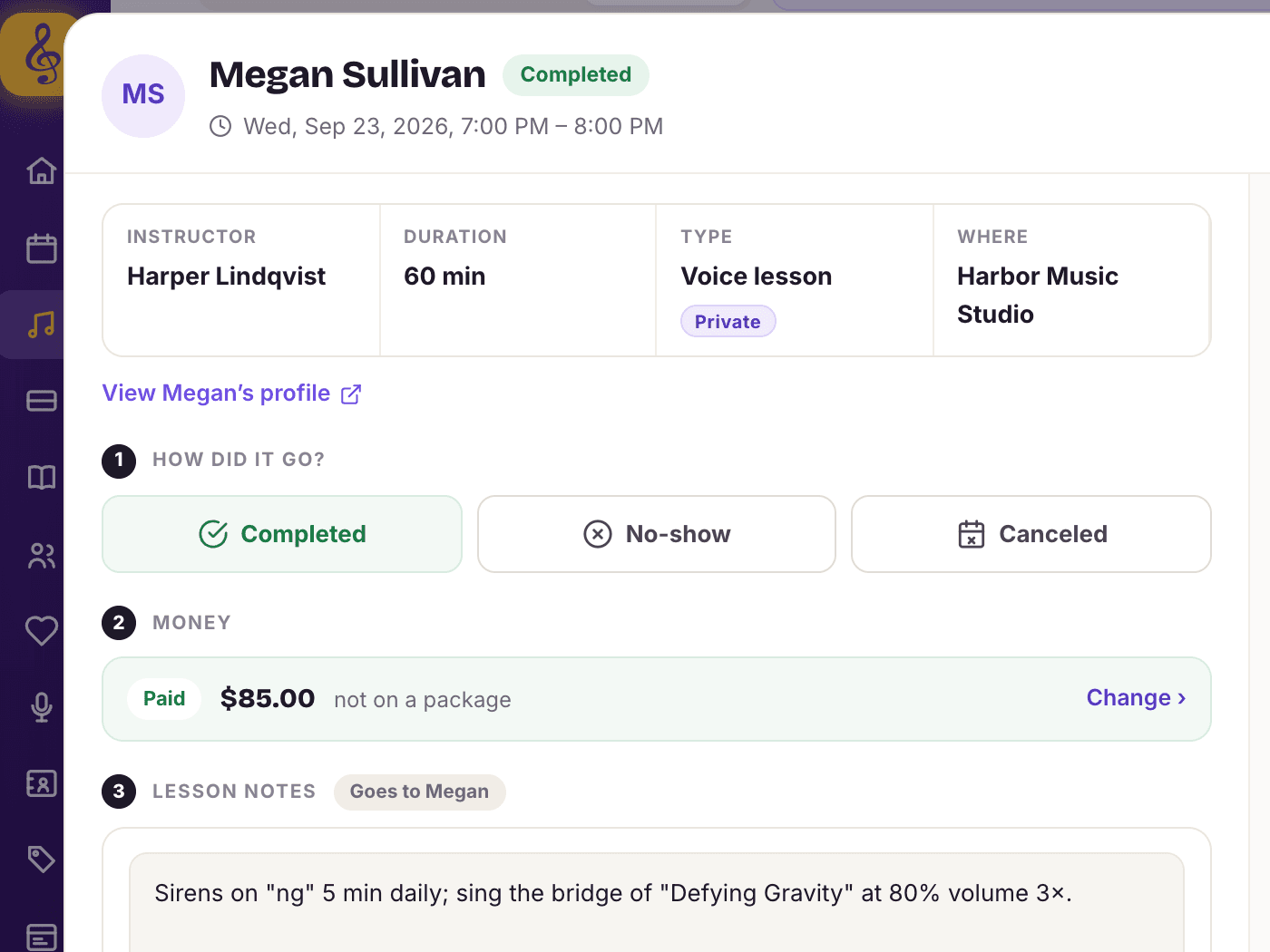
- Lesson notes: What you worked on and what to practice, shared with the student.
- Attachments: Sheet music, recordings and PDFs on the lesson, in the student's app and their recap email.
- Private notes: Staff-only notes students and parents never see.
See all 8 features
- Progress notes: A dated record of each student's progress over time.
- Practice assignments and logs: Set the current assignment. Students log practice each day and build a streak.
- Lesson recap email: From the lesson on your phone's browser, email the note and attachments to the student, or to the parent for a child.
- Attendance: Mark attended, no-show or late cancellation. Close a group class in one step.
- Lessons that need an outcome: A list of past lessons nobody has marked yet.
Messages & reminders
Learn more →Reminders that send themselves.
- Automatic reminders and confirmations: Turn on lesson reminders once and they go out by email and app notification. Booking confirmations and receipts send on their own.
- Conversations: One-to-one threads with students, parents and teachers, in the portal with an email copy.
- Broadcasts: Message students, parents, teachers, staff or contacts, by group or tag, with nobody emailed twice. Outreach email to people who are not yet your students is on the paid plans.
See all 10 features
- Text remindersPaid plans: Text messages for students who don't read email. Last-minute cancellations are texted as well as emailed.
- Schedule and follow up: Send now or later, with up to three follow-up reminders to people who didn't click.
- Campaign stats: Delivered, opened, clicked, bounced and replied.
- Templates: Reusable messages with names and details filled in for each person.
- Your branding: Your logo and brand color on every email to students.
- Replies saved on the timeline: When someone replies to a broadcast or automation, it's saved on their record and forwarded to your inbox. You can also send from your studio's own email address.
- Deliverability protection: Sending frequency is capped and complaints are watched, so your emails keep reaching inboxes.
CRM, leads & follow-ups
Learn more →Turn inquiries into students.
- Inquiry form: A form on your site or booking page for new students, with your own questions.
- Lead pipeline: Every inquiry on a board by stage, from new to first lesson booked. Drag to move. You can rename the stages.
- Contact records: Each lead's answers, history, stage and next step on one card.
See all 12 features
- Follow-ups: Set a date, a note and who's responsible. See what's overdue, due today and due this week, with a morning notification when follow-ups are due.
- Log calls, emails and notes: Every touch saved on the person's timeline.
- Stages that move themselves: A reply, a first lesson booked or a first lesson taught moves the lead forward.
- Automated follow-up sequences: Eleven ready-made email sequences: new lead, first-lesson check-in, three-month check-in, anniversary, birthday, sibling offer, win-back, welcome, review request, package running low and teacher welcome.
- Edit every step: Change the words, the days to wait between messages and the follow-up tasks in each sequence. The new-lead sequence stops on its own once the lead replies or books.
- Approve before it sends: Any automated message can wait as a draft for you to approve.
- Review requests: Ask students for a review after a set number of lessons and send them to your Google review page.
- Private feedback: Students rate their experience privately. One response per request, kept as a record.
- Webhooks: Send new leads, bookings, students and payments to your own tools.
Built for a team of teachers, not just one.
Teacher logins and payroll, recitals, reports with expense and mileage tracking, the app, and an assistant for the busywork. The bill stops at $49.
Teachers & staff
Learn more →Built for a studio with a team.
- Access levels: Admin, Front desk, Teacher, Lead teacher, or a role you create. Each role gets only the areas you allow.
- Titles: Co-owner, front desk or bookkeeper, shown next to each name.
- More than one studio: Run several studios from one login, and hand a studio to someone else with its records intact.
See all 10 features
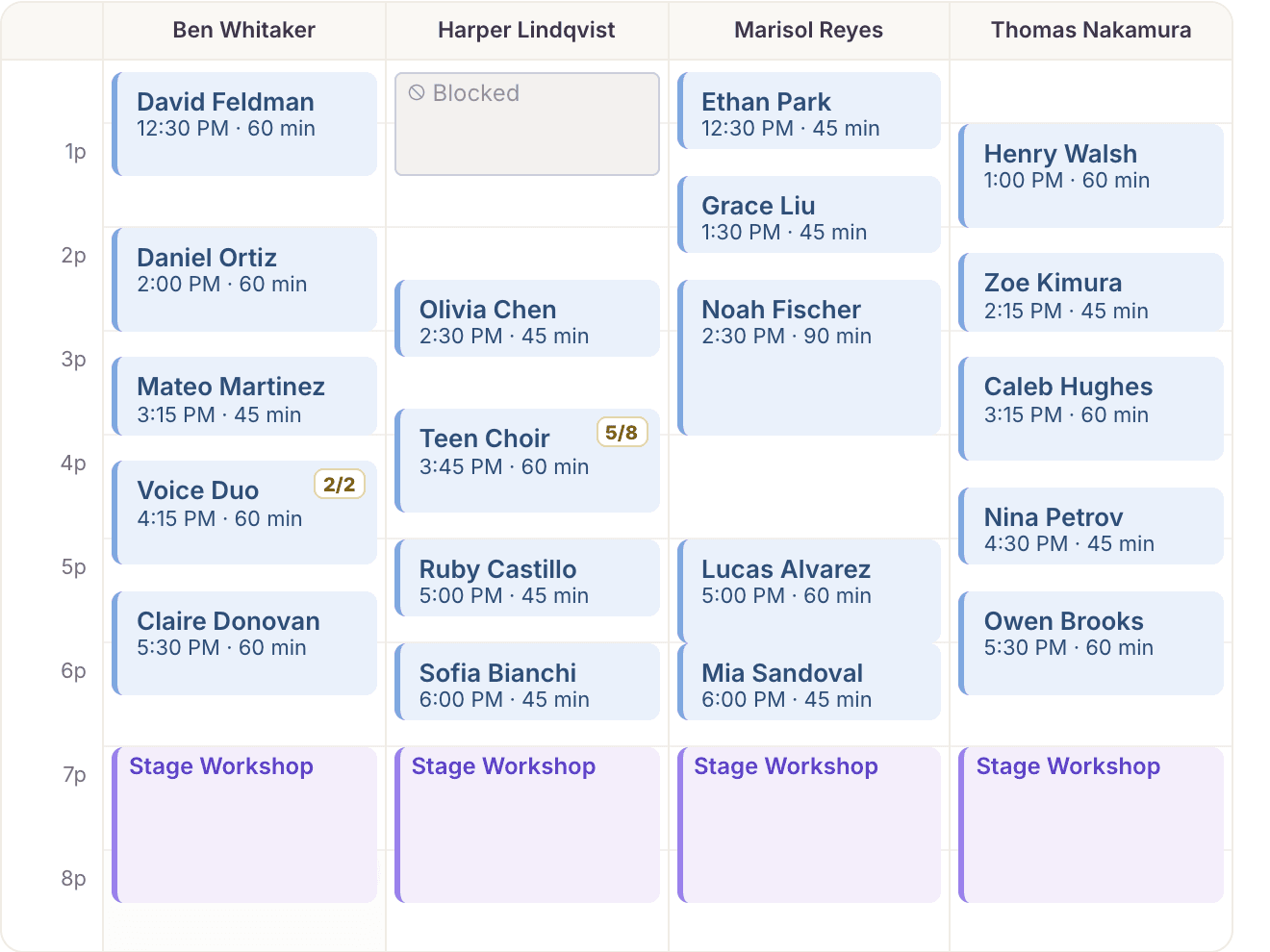
- A login for every teacherEnsemble: Their own lessons, calendar, students, messages, availability and earnings.
- Teacher payrollEnsemble: Pay each teacher by percentage split, a flat rate per lesson, or hourly. What each one is owed is worked out from the lessons they taught.
- EarningsEnsemble: Each teacher sees what they've earned and what's still to come, this week and this month.
- Payroll reports and exportsEnsemble: Each month's payable lessons itemized per teacher. Record the payout, mark it paid, then export it for your bookkeeper, QuickBooks or Xero.
- Teacher levelsEnsemble: Junior, senior or your own names, each with its own prices. A teacher can hold a different level for each instrument.
- Teacher on breakEnsemble: Keeps their booked lessons and stops new bookings.
- Teachers approve changesEnsemble: Teachers approve or decline changes to their own lessons from their phone.
Teacher payroll
Learn more →Teacher payroll that adds itself up.
See all 9 features
- Three ways to payEnsemble: A percentage split of what each lesson is worth, a flat rate per lesson, or an hourly rate for the lesson's scheduled length.
- Pay set per teacherEnsemble: Each teacher has their own pay type and rate, so a senior teacher on a split and a new teacher on a flat rate sit side by side.
- Worked out from the lessons taughtEnsemble: Each month's payable lessons are itemized per teacher, so you can see exactly what every figure is made of.
- Pay any monthEnsemble: Open the month you are paying. If last month is still unpaid, that is the one that opens first.
- Record the payoutEnsemble: Note how you paid (direct deposit, check, cash, Venmo, PayPal, Zelle or your payroll service) and a check number or reference, and the month is marked paid.
- Pay historyEnsemble: Every payout is kept with its month, lesson count, amount, method and reference.
- Earnings each teacher seesEnsemble: Teachers see what they've earned and what's still to come, this week and this month, and never anyone else's pay unless you allow it.
- Pay reports in profit and lossEnsemble: Pay for each teacher shows in profit and loss, so the studio's net is what is left after payroll.
- Payroll exportEnsemble: Teacher payouts as a spreadsheet for your bookkeeper, QuickBooks or Xero.
Events & recitals
Learn more →Run the recital, not the spreadsheet.
- Events with online registration: Recitals, workshops and group events with a public sign-up link.
- Ticket types: Each with its own price and quantity, including private tiers with their own link.
- Capacity: Registration stops at your limit, per ticket type or for the whole event.
See all 11 features
- Waitlist: When an event sells out, people join a waitlist and you admit them from the list.
- Invitations and RSVPs: Invite students from your roster. They answer Going, Maybe or Can't make it, with no login.
- Registration questions: Short answer, paragraph, choice, yes/no or number.
- Payments at the door: Record cash, check or card payments against each attendee.
- Message attendees: Write to everyone on the list at once.
- Who can attend: All students, a tag, invite only, or anyone with the link.
- Online events: Paste a Zoom, Meet or Teams link, or generate one.
- Several events at oncePaid plans: The Solo plan runs one live event at a time; Encore and Ensemble run several at once.
Reports & your business
Learn more →Know how the studio is doing.
- Revenue: Collected, trailing 12 months, projected next 30 days, and money still due.
- Retention: Retention by the month students started, where students come from, and who is at risk of leaving.
- Attendance: No-show and reschedule rates, and the students who miss most.
See all 10 features
- Capacity: How full each hour is and where the open time is.
- Profit & loss: Revenue against expenses and teacher pay.
- Expense tracking: Log studio expenses by category with a tax-deductible flag, or photograph a receipt and have it filled in.
- Mileage log: Log business miles, such as trips to students' homes, valued at the per-mile rate you set.
- Tax-time exports: Student list, lesson history, expense log and income as spreadsheets.
- A dashboard you arrange: Move, hide and add cards on Home and in Reports.
- Needs attention: Unpaid lessons, low packages, booking and reschedule requests, failed charges and incomplete intake, each with a one-tap action.
Expenses, mileage & tax reports
Learn more →Expenses, mileage and tax reports, built in.
- Expense log: Date, amount, category, vendor and a note for every studio expense. Categories cover supplies, software, rent or space, marketing, equipment, travel, meals and other.
- Tax-deductible flag: Mark each expense deductible or not, and change it later.
- Receipt scanning: Photograph a receipt and the merchant, amount, date and category are filled in for you. The receipt stays attached to the expense.
See all 10 features
- Mileage tracker: Log the miles, the date and where you went, such as a trip to a student's home. Each trip is valued at the per-mile rate you set and saved as a mileage expense.
- This month at a glance: Revenue, expenses and net for the month, at the top of your expenses.
- Profit & loss: Revenue against expenses by category and pay for each teacher, compared with the period before.
- Yearly income report: Every payment for a calendar year, by date and student, with the year's total, as a spreadsheet for your tax return.
- Expense log export: Expenses by date, category, description, amount and vendor, as a spreadsheet.
- Teacher payouts exportEnsemble: For your bookkeeper, QuickBooks or Xero.
- All your records: Download everything, expenses and mileage included, as spreadsheets from Settings.
AI assistant
Learn more →An assistant that does the busywork when you ask.
- Safe by design: It never charges a card or deletes a student, and anything that reaches a student (a message, a payment link, a portal invite) shows you the exact words and waits for your yes. Every change is recorded like one made by hand, and when a teacher uses it, it only touches their own lessons and students.
- Ask your reports: Ask a question about your numbers in plain English.
- Receipt scanning: Photograph a receipt; the merchant, amount, date and category are filled in for you.
See all 10 features
- Ask or tell your studioPaid plans: Type or say "Move Sally's lesson to Friday at 3" on the web or in the iPhone and Android app, and it's done, with an Undo. Bigger changes (canceling, adding lessons, moving several, blocking time) show a summary and wait for your yes.
- Everyday lesson jobsPaid plans: Mark a lesson taught or a no-show, record a cash or Venmo payment, send a payment link, message a student or invite them to the portal, by asking.
- Classes and waitlistsPaid plans: Enroll a student in a class, put them on its waitlist or take them out of one session, just by asking.
- Smart import: Upload a messy spreadsheet from your old software; the columns are matched for you.
- Tag suggestions: Finds programs and events mentioned in lesson notes and suggests a tag with the students already in it.
- Parent progress summary: A plain-language summary of a student's practice and progress in the parent's portal.
- Help in the app: Ask a how-do-I question and get an answer from the Clefsy guide, with the steps for the screen you're on.
The app & signing in
Learn more →Your studio, on your phone.
- iPhone and Android apps: For owners, teachers, students and parents. On the App Store and Google Play.
- Works in any browser too: The site switches to a phone layout automatically, so nobody has to install anything.
- Run the studio from your phone: Today's lessons, payments, reports, availability, requests and student invites.
See all 6 features
- Students book from the phone: Including recurring lessons, packages and signing waivers.
- Notifications: Bookings, cancellations, payments and follow-ups, as app notifications.
- No passwords: Sign in with a one-time code by email or text, or with Google or Apple.
Your data
Your data is always yours.
- Bring it with you: Import from the software you use now, any spreadsheet, or your calendar.
- Take it with you: Export any list and your full records as spreadsheets.
- Student data requests: Students can request everything held about them.
See all 4 features
- Closing is reversible: Closing an account can be undone for 30 days.
Start free. Never pay more than $49.
Solo studios are always free. Encore is $10 a month, each extra teacher is $5, and the bill never goes above $49. You never pay per student.
Start free →